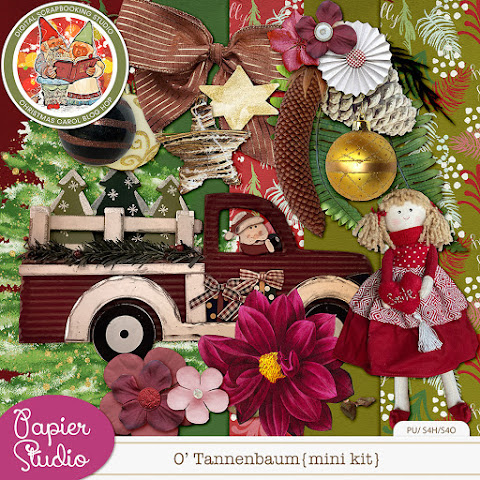
Every year the Studio Designers gather together to “sing Christmas Carols” with festive carol-themed mini kits. Put on your dancing shoes & singing voices and come caroling with us!
Welcome to the Studio’s Annual Christmas Carol Blog Hop. Every year the Studio Designer’s gather together to “Sing Christmas Carols” to all of our members, customers, fans & friends.
It’s a way for us all to say Merry Christmas and a big Thank You for being so supportive of us!
Each participating Designer has chosen a special Christmas Carol just for you and designed an adorable freebie around it! So put on your dancing shoes & singing voices and come caroling with us!
it's (international) DIGITAL SCRAPBOOKING DAY again!!! And we have a great BLOG HOP with DSA and you will love my watercolor papers that I made using my brushes and my softart actions.
Scroll down to see and download for free the papers!
TUTORIAL
I have an easy tip on how to recolor multicolored softart papers, take a look here below at my photoshop tutorial:
1- choose a color sheme (see here color inspirations)
2- Open one softart paper in Photoshop - you can use my paper by downloading it here
3- Duplicate the background paper many times. ( layer > duplicate layer)
4- Recolor each layer:
a- select one layer (hide others). Define the foreground color (with the color picker choose from the color sheme).
b- Go to IMAGE > adjustments > hue and saturation > CHECK COLORIZE and change the saturation slider and the lightness slider. See image below:
c- repeat these steps for each color / each layer. Then add layer mask (go to LAYER > LAYER MASK > HIDE ALL) like my example here below:
5- Now pick a brush - any soft brush - for example a soft round brush - and select the black mask and paint and stroke with withe color on the image in order to show some details from each layer.
Try it, working with masks always looks scary, but it is logical and easy!! White color shows off and black color hides parts of the layer paper. Changing from white foreground color to black is a way to work in a non destructive mode.
DSA BLOG HOP - my part: watercolor papers for personal use! (sorry, download expired)
Hi all, olá a todas! hoje uma nota bem rapidinho....
today a very quick note! Minha antiga action, que só era compatível até o Photoshop CS3 foi atualizada e agora também funciona com as versões mais novas até o CS6. E a licença mudou para cu4cu.
I have my "old" Photoshop Paint Action revamped and now compatible with all versions of Photoshop CS2 up to CS6! And now the licence is CU4CU. You can make very unique digital scrapbooking papers to sell or use for yourself. Please follow my Terms of Use and do not resell them in other medias, different from digital scrapbooking world. My TOU is here.
Today is Black Friday and this action is 58% off only few days here
Hoje ela está com um desconto especial (poucos dias) de 58%, aproveite aqui
Tutorial how to use my Soft Art Action 2 - paint
Here is a short tutorial how it work:
1-install all brushes, tool presets and the action into Photoshop. instale todos os itens no photoshop (estão na pasta install to PS)
2-Then play part 1 of the action – and change the colors execute a parte 1 da action
3-Play part 2 of the action and then add texture overlays. clique no play novamente na segunda parte da action e depois adicione uma overlay com textura.
4-Or continue stroking with the same tool, but varying the brushes. Always see if shape dynamics are checked! Se quiser, continue com a mesma ferramenta (art history brush) mas vá revezando os brushes sempre deixando o shape dynamic ativado.
Como sugestão, é bem legal comprar brushes da designer Amanda Rockwell, ela vende na Scrapbookgraphics, alguns vem com a licença CU4CU e aí vcs podem criar mais efeitos!
If you bought commercial use (or CU4CU) brushes, you can use them also.
Here is a sample that I did with Amanda Rockwell CU4CU Textureful 2 brushes.
Ah, as possibilidades são inifinitas. Brinque com os blendings (overlay, multiply, etc) e experimente bastante!
Finally you can also play with blending modes on each layer in order to get unique results!!
Here is a sample of 2 free overlays that is great for photographers to create a lightning effect. Veja abaixo como eu usei esse sample paper que vcs podem pegar free. Use como overlay em fotos de bebês para suavizar os traços ou mesmo recorte uma foto e use o papel softart como fundo!
Hi all!
My painting course with the new mixer brushes is very interesting and I'm really in love with them. The first part of the course we had to use a photo as base and painting with the colors of the photo and mixing and blending them to achieve a painting look. Painting Over a Photograph The CS5 course with Kirk Nelson at Digital Art Academy you can find here.
This is my brothers little Granddaughter Leticia. I used the picture and followed the steps.
But it was not easy, and my Photoshop also froze and I lost a good part of my work. This was the first time that this happen... may be these brushes and the preview of them is to heavy for my pc.
The Hair was so difficult for me, that I really had to go back and delete everything what I did. I never did a portrait before, so I used a paint program (dynamic auto painter) to make a sample piece for me and I used this to study the shadows and lightning parts of the face. I also "cheat" a little bit, and used the clone brush to bring the hair and the ball parts in.
The background is from my personal paper/ background action - i used the original colors - and I added it with a soft blending on top of the layers. Painting your own original Art
In the second part of the course, we had to paint from sketch. We used a pear sketch given to us by our teacher Kirk Nelson. This was really a challenge to learn how these brushes work and here below is my pears painting result: This was a great exercise, and I love painting the pears.
The detail brush is what I liked most to do in order to give some little enhances to the work!
And I also used one texture blend brush from John Derry's collection (see my further post here at my blog) to add little details.
The canvas is from my personal collection (I did a handmade recycled paper), blended with Kirk's canvas. Thanks for looking! Here is a collection of some of my preferred canvas that I put in my store at DDR I also used these brushes to paint a Giraffe!! I loved doing this so much - it is like a therapy - and I'm offering this little mini kit for FREE only for few days at my shop at DDR store.
download expired
See here in YouTube a interesting summary with the 5 fav's features of CS5 Happy Scrappings!
sorry for not posting every week here, as I would love to do!!!
I have so much to tell you and I have so much tips that I want to share with you, but you have to wait a little bit....
I found the Digital Art Academy where I'm participating with 2 online courses. Wowoowww!! They are so great!! Its a watercolor course. Digital watercolor... you cannot believe that they look so real with ArtRage!!! and the other is also digital painting with Corel Painter. wow. I love my PS and also immediately felt in love with Painter!!!
So I hope that you will understand my absence and please come back again to see what secrets I have to share with you!!!
And for the (i) NSD I'm going to give my new product for free for 5 days... hurry and catch it while you can!!!
Meninas
eu fiz um produto novo e coloquei como free por 5 dias para festejar o dia internacional do Scrapbooking na HM Scrap Shop.
Também tenho outro freebie na minha loja CU 4 YOU e tenho certeza de que esse também vai agradar!
Desejo a todos um excelente final de semana e passear pelas lojas de scrap é um programão, uma vez que tem muiiiiiita promoção e oferta de freebies!
Some of CIA dos Scraps Store wonderful designers made a beautiful Back to School Collab kit for you to enjoy FREE. Grab it and make sure to make a stop at all participants blog in order to get the full collab!
I'm new designer at NDISB and I'm very proud of it. July is a vacation month and I have been away from the PC and stayed outside, traveling with my family. So I didn't participate so much as I want in the forum, but I intend to bring you in future many news from this wonderful store/ forum. It's a great place and I recommend it!
If you lost the opportunity to get my freebie from the prior post, go over to my shop at NDISB an grab it there!! It's free!
My new products: And here are my hand painted papers with a beautiful color palette: BLOG TRAIN: Some of HM's ScrapShop wonderful designers made a beautiful Friendship Collab kit for you to enjoy FREE. Grab it and make sure to make a stop at all participants blog in order to get the full collab! My part:
this link is no more active!
Follow the links below to grab the others Freebies: